
How to Read a Wholesale Stock List Before Ordering Amazon Inventory
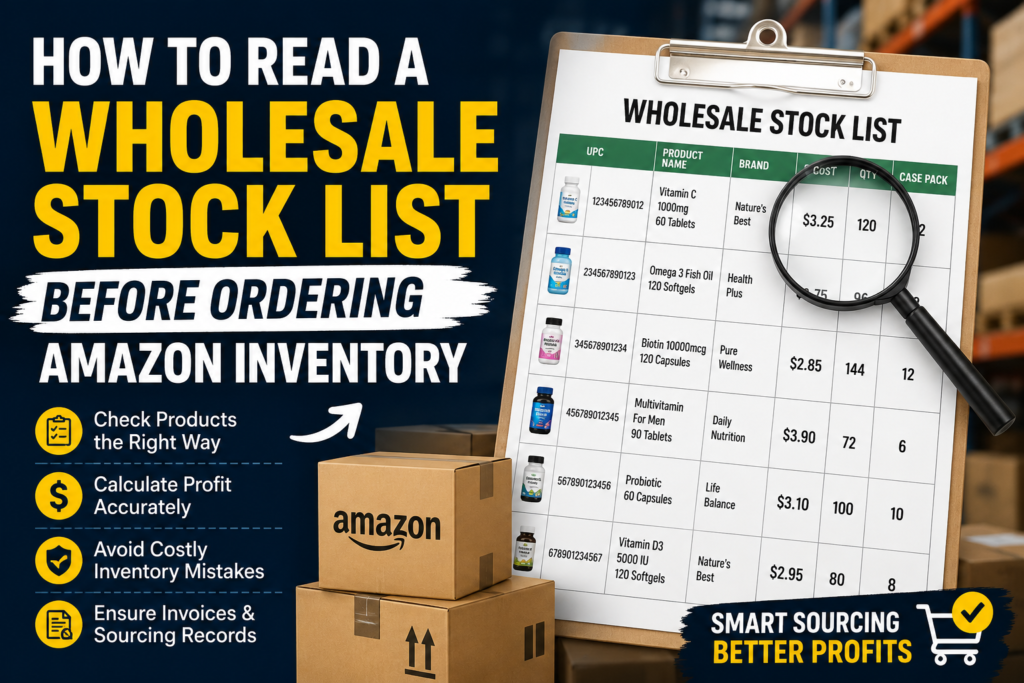
Ordering inventory is one of the biggest decisions an Amazon FBA seller makes. A stock list may look simple at first, but it can carry a lot of important information: product names, UPCs, SKUs, case packs, wholesale cost, available quantity, brand names, minimum order requirements, and sometimes invoice or authorization details. For beginner wholesale sellers, the problem is not only finding a supplier. The real challenge is knowing how to read the stock list before spending money. One wrong decision can lead to slow-moving inventory, restricted products, pricing issues, or sourcing records that do not support your Amazon business properly. In our previous guides, we discussed Amazon account health for wholesale FBA sellers, wholesale business setup for new Amazon sellers, and Amazon wholesale invoice requirements for FBA sellers. This article continues that conversation by explaining how to read a wholesale stock list before ordering Amazon inventory. Quick Answer A wholesale stock list for Amazon FBA should be reviewed by checking the product title, brand, UPC, SKU, wholesale cost, available quantity, case pack, minimum order quantity, Amazon restrictions, selling price, estimated fees, competition, sales rank, and invoice support. Sellers should not order inventory only because the price looks profitable. They should verify product authenticity, category requirements, and sourcing records before purchasing. What Is a Wholesale Stock List for Amazon FBA? A wholesale stock list is a product list shared by a distributor or supplier that shows available inventory for wholesale buyers. Amazon FBA sellers use this list to research products, compare prices, check demand, and decide what to order. A stock list may include: Not every supplier formats stock lists the same way. Some lists are simple spreadsheets. Others may include detailed product data. The key is knowing what each column means and how it affects your Amazon FBA decision. A good Amazon seller does not just scan the list for low prices. They study the full product details and compare them with Amazon marketplace data before placing an order. Why Reading a Stock List Correctly Matters for Amazon FBA Sellers A wholesale stock list is not just a buying sheet. It is a decision-making tool. If you read it correctly, it can help you avoid poor inventory choices and build a stronger sourcing process. It Helps You Avoid Bad Inventory Many sellers lose money because they order products without checking demand, fees, restrictions, or competition. A product may look profitable on the surface but become risky after Amazon fees, storage costs, price changes, or selling restrictions. Reading the stock list properly helps you filter products before spending money. It Supports Better Account Health Amazon may ask sellers for invoices or sourcing documents in certain situations. This may happen during approval requests, authenticity reviews, or category checks. Working with a reliable distributor and keeping clean records can help sellers manage sourcing documentation more professionally. A proper stock list, combined with clear wholesale invoices, can help sellers keep better sourcing records. However, Amazon requirements may vary by category, brand, and marketplace. It Helps With Smarter Product Research A stock list gives you the starting point. Amazon product research tells you whether the item is worth buying. When both are used together, sellers can make better decisions. You should compare supplier data with Amazon data such as: This helps you avoid emotional buying and focus on data-based sourcing. Step-by-Step Guide: How to Read a Wholesale Stock List Before Ordering Step 1: Start With the Product Name and Brand The first thing to check is the product name and brand. Make sure the product on the stock list matches the actual Amazon listing. Similar product names can cause confusion, especially with different sizes, bundles, flavors, colors, or pack counts. For example, a supplier may list a product as “Vitamin C Gummies 60 Count,” but the Amazon listing may be for a 2-pack, 90 count, or different flavor. If you match the wrong listing, your profit calculation and inventory plan will be incorrect. Check: Never assume two similar products are the same. Step 2: Check the UPC or EAN Carefully The UPC or EAN is one of the most important parts of a wholesale stock list. It helps you match the product to the correct Amazon listing. Before ordering, copy the UPC and search it on Amazon. If it matches the exact product, continue your research. If multiple listings appear, review them carefully. If no listing appears, the product may need deeper research. A UPC mismatch can create listing problems, wrong inventory decisions, or compliance issues. For Amazon sellers, accuracy is very important. Step 3: Understand Supplier SKU vs Amazon ASIN A supplier SKU is the distributor’s internal product code. An Amazon ASIN is Amazon’s product identifier. They are not the same thing. Many beginner sellers confuse supplier SKUs with Amazon ASINs. The supplier SKU helps the distributor manage inventory. The ASIN helps sellers find and analyze the product on Amazon. When reviewing a stock list, you should: This process helps prevent ordering the wrong item. Step 4: Review the Wholesale Cost The wholesale cost is the price you pay per unit before shipping, prep, taxes, or other expenses. Many sellers make the mistake of calculating profit using only the wholesale cost. Your real cost may include: A product that looks profitable at wholesale price may not be profitable after all costs are included. Always calculate landed cost before ordering. Step 5: Check Minimum Order Quantity and Case Pack Some distributors sell products in case packs. For example, a product may have a case pack of 12, 24, or 48 units. You may not be able to order just one unit. Check: If a product sells slowly and the minimum order quantity is high, it may not be a good first order. New sellers should be careful with large quantities until they understand demand and competition. Step 6: Check Available Quantity Available quantity tells you how much stock the distributor currently has. However, this number may change quickly, especially for popular products. Before placing